



Auto Captions for Faceless Videos That Still Hold Attention
Use auto captions for faceless videos so voiceover clips stay watchable with sound off. Learn timing, placement, contrast, and export choices when there is no face anchoring the frame.
Caption your next video free

Omar Raza
Auto Captions for Faceless Videos That Still Hold Attention
Auto captions for faceless videos are not a nice extra. On mute autoplay, the words often are the performance. There is no face to signal emotion, so timing, contrast, and placement have to do more work.
This guide is for voiceover, screen demos, stock B-roll channels, and other clips where the speaker is not on camera.
Why faceless clips fail without strong captions
A talking-head video can survive average captions because viewers still see a person. A faceless clip that starts muted can feel like random footage with a soundtrack the viewer never hears.
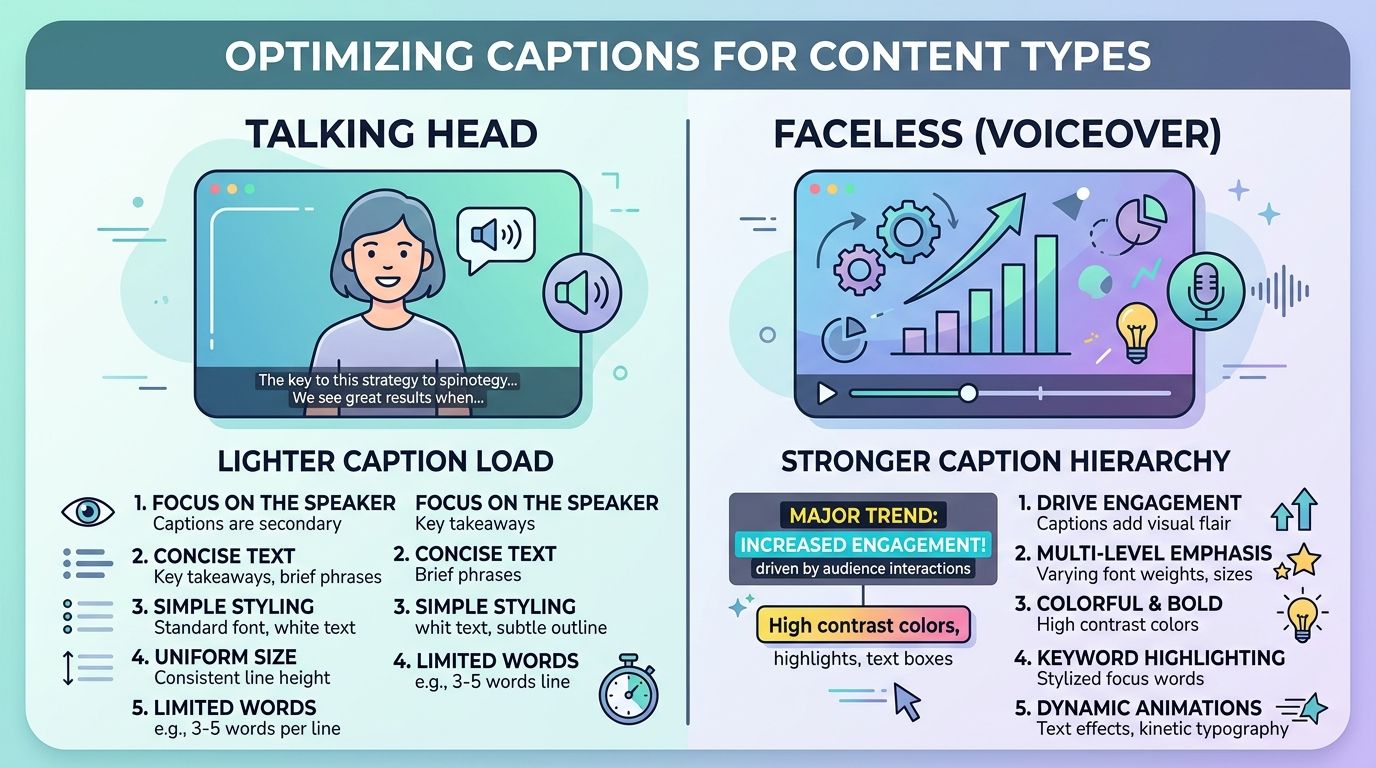
If the first line is late, tiny, or low contrast, people swipe. Captions are part of the hook, not a subtitle afterthought.
Build the hook in text, not only in audio
- Write or speak a first line that makes sense without sound.
- Make sure that line appears in the first second on screen.
- Keep the first caption block short enough to read at a glance.
- Save the denser explanation for second three onward.
If your voiceover buries the point, captions cannot rescue a soft open. Fix the script, then style.
Timing patterns that help voiceover
| Pattern | Use when | Avoid when |
|---|---|---|
| Short phrase + word highlight | Lists, tips, punchy hooks | Long legal or dense sentences |
| Steady two-line blocks | Calm explainer tone | You need aggressive retention motion |
| Faster cuts on keywords | Ads and pattern interrupts | Educational clips that need breathing room |
Word-level highlight is especially useful on faceless videos because motion gives the eye a place to land. See word-by-word captions and karaoke captions for TikTok when you want that pattern without turning every line into a sticker show.
Placement when B-roll is busy
Faceless footage is often busier than a centered talking head:
- Hands, products, and UI fight for the same middle band
- Stock clips may already include burned text
- Screen recordings have their own buttons
Rules of thumb:
- Prefer a stable caption band and move it only when the subject needs the space
- Never cover the exact detail the voiceover is naming
- If the B-roll has existing text, pause on a cleaner frame or shift the caption up
Style families and readability trade-offs are covered in best caption styles for Reels and TikTok.
Contrast beats decoration
On faceless channels, soft grey text dies against bright kitchens, white desks, and sunny outdoors. Use:
- Strong fill color
- Outline or soft box behind the words
- Larger type than you think you need
- Fewer simultaneous animations
Pretty templates that look great over a dark studio portrait often fail over lifestyle B-roll.
Workflow that scales for volume channels
Faceless channels often publish more often. Keep the stack boring on purpose:
- Finish audio and picture.
- Generate auto captions.
- Proof names, URLs, and numbers.
- Apply one saved preset.
- Export captions into the file.
- Reuse the same master on each platform.
Changing templates every day costs more time than it earns attention.
When app captions are enough
Native TikTok or Instagram captions can work for a quick test post. They are a weaker fit when:
- Your channel identity depends on a specific caption look
- You cross-post the same master everywhere
- You need word highlights the apps do not style the same way
Honest limits
- Captions cannot fix a confusing voiceover.
- Very fast stacked tips still need human line breaks.
- Noisy source audio still produces messy drafts.
Pair captions with intentional B-roll
Faceless does not mean random stock. Each caption beat should land on a frame that supports the claim.
- When the line names a product, show the product.
- When the line gives a number, show a clean frame with room for the digits in captions.
- When the line is emotional, pick B-roll with simpler backgrounds so bold type still pops.
If picture and words fight, viewers feel friction even if they cannot explain why.
Accessibility is part of growth here
Faceless channels often attract viewers who scroll muted by habit. Clear captions help:
- Deaf and hard-of-hearing viewers
- Viewers in public spaces
- Viewers whose first language differs from the voiceover
You do not need a separate "accessibility episode" to benefit. Readable captions are the accessibility feature and the retention feature at the same time.
Weekly review for volume posters
Once a week, watch five published faceless clips on mute only. Note:
- Which hooks were readable instantly?
- Which captions collided with busy B-roll?
- Which presets felt too soft?
Adjust the preset, not your entire niche, based on those five watches.
Practical next step
Treat captions as the on-screen host for faceless video. Generate a timed draft, force a readable first second, use stronger contrast than talking-head defaults, and export a master you can reuse.
If you want that caption pass in the browser on a finished voiceover clip, start with AutoCaption and watch the export muted before you batch the rest of the week.
Written by
Omar Raza
Language and accessibility specialist at AutoCaption. Focused on Urdu script, Roman Urdu, and right-to-left caption workflows.
More topics you may like

Caption Styles
Subtitle Line Length and Reading Speed: Practical Guidelines

Sara Malik

Caption Styles
How to Caption Videos for Accessibility
Sara Malik

Caption Styles
Closed Captions vs Open Captions: Which Format Should You Use?

Amina Qureshi

Caption Styles
How to Caption Music and Sound Effects in Video
Sara Malik

Caption Styles
Subtitle Formatting Guidelines for Clear, Readable Video
Amina Qureshi

Caption Styles
European Accessibility Act and Video Captions: What Creators Should Know
Omar Raza