



Opus Clip Alternative When Your Short Is Already Cut
Need an Opus Clip alternative for already cut shorts? Keep Opus when you still need long-to-short clipping. Switch to a captions-focused tool when the vertical cut exists and timed captions are the only remaining job.
Caption your next video free

Amina Qureshi
Opus Clip Alternative When Your Short Is Already Cut
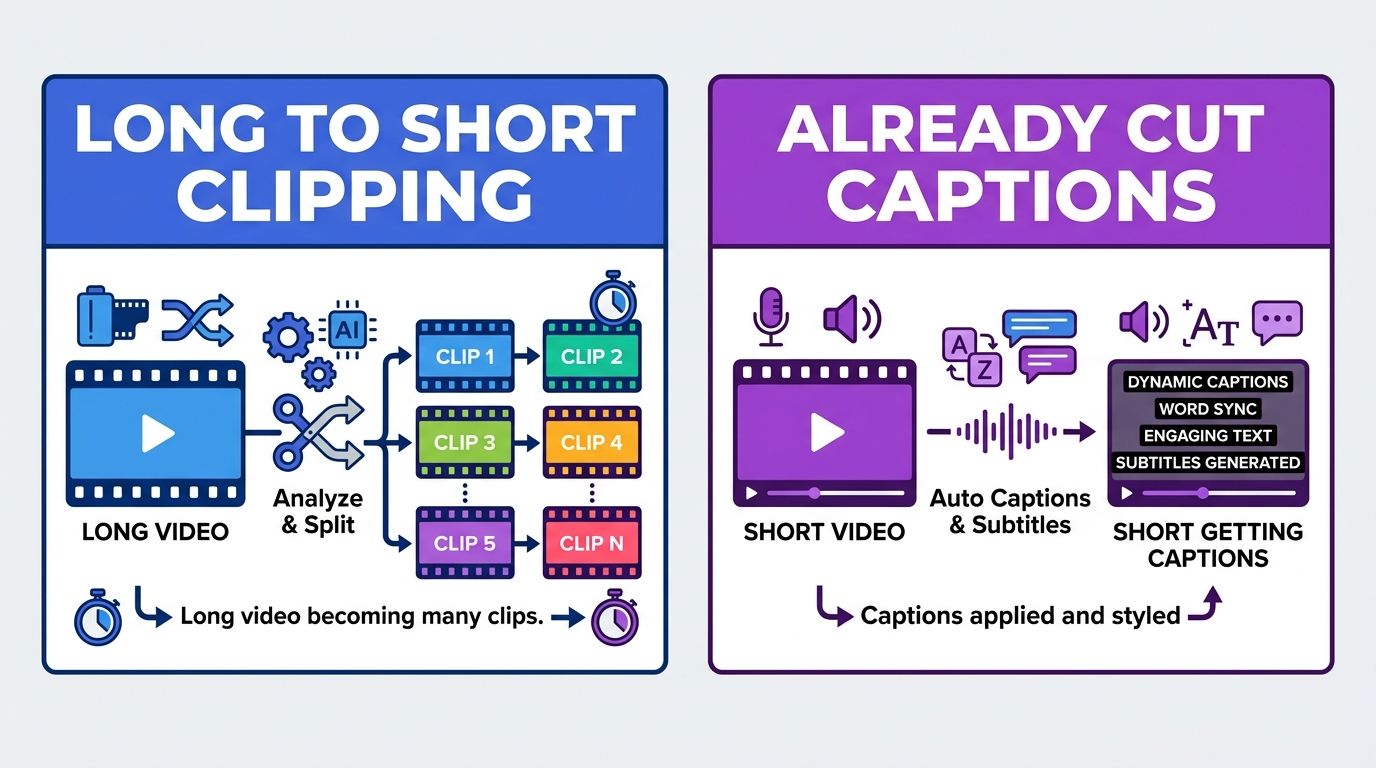
You do not need another long-to-short engine when the short already exists. An Opus Clip alternative for already cut shorts is really a post-clip caption lane: take the approved vertical candidate, fix the spoken words, style them for mute viewing, and ship.
Opus Clip earns its keep earlier in the pipeline, when a podcast or webinar still needs hook detection and many candidate cuts. After a producer says "this 34 second file is the one," the job changes.
Where the handoff should happen
Think in two lanes:
- Find and cut. Long source in. Candidate shorts out.
- Caption the winner. One approved short in. Captioned master out.
Problems start when lane 1 stays open for lane 2 work. You scroll clip suggestions you no longer need. You hunt settings meant for reframing. You delay a text fix that should take minutes.
Signs the cut is done (so stop clipping)
- Stakeholders approved the picture and pacing
- No more "find me three other hooks" requests this week
- The remaining complaints are wrong names, missing words, or weak readability on mute
- You are about to upload to TikTok, Reels, or Shorts today
If those are true, keep your clipper for next week's long file. Do not force today's caption polish through it.
Signs you still need Opus-style clipping
Stay in the long-to-short tool when:
- The source is still a long interview or stream
- You need AI to propose many candidates you have not reviewed
- Reframing faces and layouts is unfinished
- Captions are optional polish after a cut wins, not the blocker
In that case, "alternative" means a different clipper, not a caption workflow.
What the post-clip caption lane must do
| Requirement | Why it matters on an approved short |
|---|---|
| Fast upload of one vertical file | The project already exists elsewhere |
| Easy transcript edits | Names and numbers break trust |
| Readable style on mute | Feeds start without sound |
| Stable placement | Platform chrome covers edges |
| Export into the picture | Same master across apps |
AutoCaption is built for that lane in the browser. Bring the short you already cut, correct the transcript, style word timing, export. Open the homepage when the cut is locked.
How this differs from other "alternative" pages
Those pages answer different tool gravity:
- CapCut pages: mobile editor versus caption-only browser work
- VEED pages: broad browser suite versus caption-only work
- Captions.ai pages: AI mobile studio versus caption-only work
This page answers clipping gravity: long-source repurposing versus post-approval text. Link out only if your heavy tool is not a clipper:
- CapCut captions alternative
- VEED alternative for short-form captions
- Captions.ai vs a browser caption tool
Operating model for a small team
Producer locks the candidate short and drops it in a folder named approved-shorts.
Caption owner never reopens the long project for those files. They only work from approved-shorts.
Scheduler uploads the captioned master. If a hook fails in comments, the request goes back to clipping lane as a new cut, not as a caption rewrite of a bad moment.
That separation prevents "one more reframing pass" from blocking daily posts.
A one-week experiment
Day 1: Cap three already-approved shorts outside the clipper.
Day 2-4: Keep using the clipper for new long sources only.
Day 5: Compare time spent. If caption fixes got faster and clipping volume stayed healthy, make the dual lane permanent.
If caption quality inside your clipper is already excellent and you barely do post-approval edits, stay put. Do not invent a migration for sport.
File naming that prevents rework
Use boring names that encode status:
ep14-raw.mp4for the long sourceep14-hook07-candidate.mp4for unreviewed clipsep14-hook07-approved.mp4for locked pictureep14-hook07-captioned.mp4for the publish master
Anyone on the team should know whether a file still belongs in clipping lane or caption lane from the filename alone. Slack threads that say "the latest one" waste more time than a strict naming rule.
Limits to respect
- Caption software cannot invent viral moments from a raw two-hour file.
- Clippers remain the right center when discovery of hooks is the scarce resource.
- Vendor feature lists move. Re-verify the week you change process.
Practical recommendation
Use Opus Clip, or any long-to-short tool, while the short does not exist yet. After the short is locked, use a captions-focused Opus Clip alternative for already cut shorts so transcript cleanup does not live inside a repurposing dashboard.
If you are holding an approved MP4 right now, caption it in the browser and judge the muted first second before you open another clipping project.
Written by
Amina Qureshi
Motion and Style Designer at AutoCaption. Builds readable caption looks for Reels, TikTok, and Shorts.
More topics you may like

Comparisons
Best Caption Generator for Online Courses: A Practical Guide
Amina Qureshi

Comparisons
Free Subtitle Maker for MP4 and SRT: Which Workflow Fits?

Omar Raza

Comparisons
Caption Generator for LinkedIn Videos: What Professional Creators Need

Sara Malik

Comparisons
Best Caption Generator for Podcasts: What to Compare
Omar Raza
Comparisons
VEED Alternative for Short-Form Captions (When You Do Not Need the Full Suite)
Amina Qureshi
Comparisons
Captions.ai vs a Browser Caption Tool: Which Job Are You Hiring?
Sara Malik