Urdu Script Captions for Reels: Why Burn-In Beats Subtitle Files
Generate Urdu script captions for Reels and TikTok, keep right-to-left text readable, and burn them into the video so social players do not swap your font.
Caption your next video free

Omar Raza
Urdu Script Captions for Reels: Why Burn-In Beats Subtitle Files
Urdu Nastaliq captions for Reels look right when the letters you approved travel inside the video pixels. A separate subtitle file only ships text. Each player can swap the font, flatten the connections, or squeeze the line height until cascading Urdu becomes hard to read.
This page is about Perso-Arabic Urdu script on vertical social video. It is not the Latin-letter workflow. For WhatsApp-style spellings in English letters, use the Roman Urdu caption generator guide. For choosing which script your audience prefers, start with the Urdu and Roman Urdu caption guide.
The font lottery problem
Urdu readers expect connected letterforms. Many phone players default to a simpler Arabic-looking face that feels flatter than the cascading shapes people know from print and Pakistani TV. Line spacing that works for English often clips ascending and descending strokes in Urdu.
| How you deliver text | What stays stable | What can break |
|---|---|---|
| Words drawn into the MP4 | Font, size, color, RTL direction | Later text edits need a new export |
| Sidecar subtitle (SRT/VTT) | Words and timing only | Font, weight, and line height per player |
| Platform auto text | Speed | Script quality and brand control |
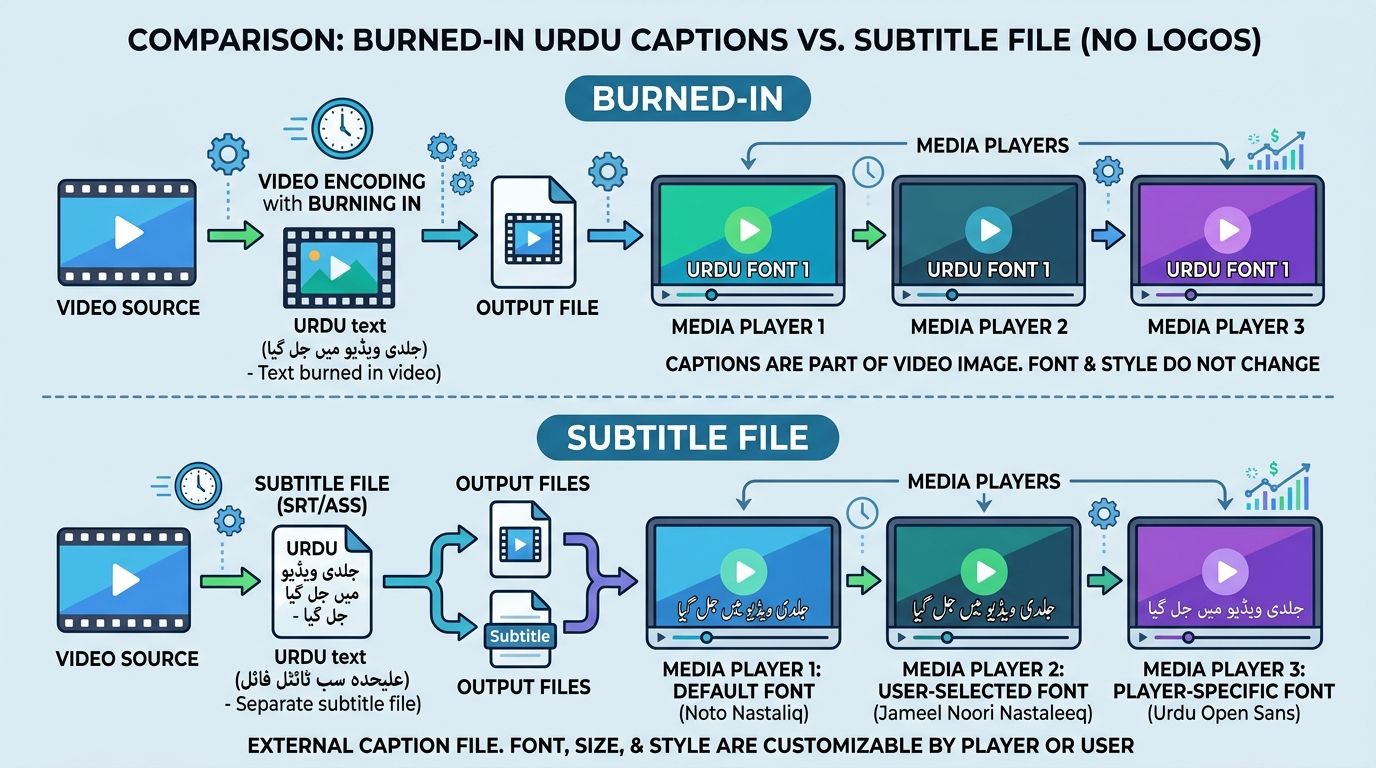
Reels and TikTok are public surfaces. Prefer the stable look. Keep a subtitle file only when you also need an editable YouTube track.
What to check before you trust an export
Do not judge Urdu captions on a laptop alone. Test on a phone in portrait.
- Direction. Lines must read right to left. Mirrored or LTR-forced blocks fail immediately.
- Connections. Letters that should join must join. Broken shapes look like typing errors.
- Mixed English. Brand names inside an Urdu sentence should stay readable without flipping the whole line the wrong way.
- Vertical room. Cascading script needs more height than English. Two stacked Urdu lines often need extra gap.
- Safe band. Place text in the middle third. Lower thirds collide with Reels and TikTok chrome. Upper thirds collide with status UI.
If any of those five fails, fix placement or re-export. Do not publish and hope the app "fixes" the script later.
A short production path that respects Urdu script
- Lock the 9:16 cut and the final voice track.
- Transcribe with Urdu selected (or confirm auto detect chose Urdu, not Arabic-only).
- Proof names, places, and English product words slowly. Automatic tools often guess English brands wrong inside Urdu speech.
- Style with a face that keeps connected forms readable at phone size. Avoid ultra-thin weights.
- Burn the approved look into the video.
- Upload the MP4 to Reels or TikTok. Do not re-generate captions inside the app on top of burn-in unless you intend a second layer.
AutoCaption can generate Urdu-script, word-timed captions and export a burned-in vertical file. Upload a short talking clip from the homepage, review shaping on a phone preview, then export.
Placement tips unique to cascading script
English caption habits fail Urdu often:
- Do not pack five short English-style words into one dense block. Prefer natural phrase breaks.
- Leave air above and below the line so descending strokes do not collide with the next cue.
- Avoid covering mouths. Urdu lines are often taller, so a "safe" English placement can still hide a face.
- Watch dark text on dark clothing. Connected script disappears faster than block Latin letters.
When a subtitle file still helps
Burn-in wins for Reels and TikTok presentation. A subtitle file still helps when:
- You maintain a YouTube cut with editable captions.
- A client needs a text deliverable for translation review.
- You archive timing data for a later restyle.
Those are production backups, not the public social look.
Clips that mix Urdu and English mid-sentence need an extra proof pass. See Urdu English captions for mixed speech.
Decision table
| Goal | Prefer |
|---|---|
| Public Reel or TikTok look | Burn Urdu script into the file |
| Editable YouTube track | Subtitle file (plus burn-in if you also post socially) |
| Audience that reads Latin Urdu | Roman Urdu workflow, not this page |
| Fast but low control | Platform auto text (accept the font risk) |
Urdu Nastaliq captions for Reels succeed when viewers see the same connected script you approved on your phone. Burn that look into the file. Treat subtitle files as archives and YouTube helpers, not as the social presentation layer.
Proofing connected script on a real phone
Laptop previews hide problems that phones reveal. Zoom the export to full screen in portrait. Watch for:
- letters that disconnect mid-word
- lines that flip direction when an English brand name appears
- cascading shapes that collide when two cues stack
- thin strokes that vanish on busy backgrounds
Fix those before you upload. Social apps will not repair shaping after the fact.
Brand and client delivery notes
Clients often ask for both a social MP4 and an editable text track. Deliver burn-in for Reels and TikTok, plus an SRT for archive or YouTube. Label the files clearly so editors do not upload the subtitle-only package as the public Reel.
When the brief demands a specific cascading Urdu look, lock the font in the burn-in export. Do not promise that look from a sidecar file alone. Players outside your control can substitute a flatter face overnight.
If your audience mixes Roman Urdu comments with Urdu-script viewers, pick one on-screen script per post. Mixing both in the same caption block usually hurts both groups. Use the Roman Urdu generator guide when Latin letters are the right fit, and keep this burn-in path for Perso-Arabic script posts.
Written by
Omar Raza
Language and accessibility specialist at AutoCaption. Focused on Urdu script, Roman Urdu, and right-to-left caption workflows.