



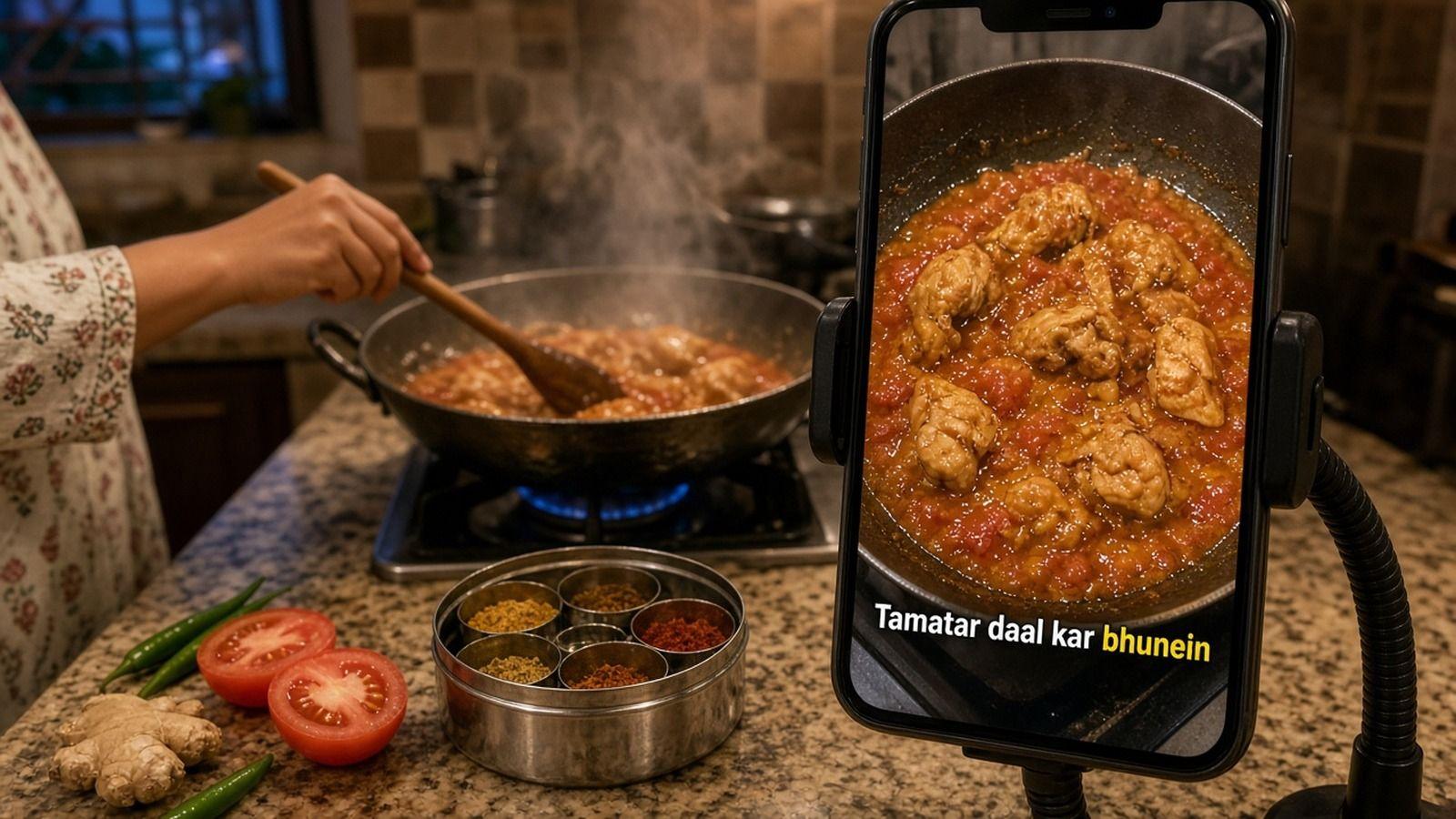
How to Add Captions to Cooking Videos and Recipe Reels
Add captions to cooking videos muted viewers can follow. Proof amounts and ingredient names, handle Urdu, Hindi, and Roman Urdu, and keep text off the food.
Caption your next video free

Omar Raza
How to Add Captions to Cooking Videos and Recipe Reels
Most people scroll recipe Reels with the sound off, often with one hand while the other holds a spoon. If the ingredients and steps only live in your voiceover, a muted viewer misses the recipe. Captions fix that, as long as the amounts are right and the text doesn't cover the food.
This guide shows how to add captions to cooking videos step by step. It gives extra care to creators who cook in Urdu, Hindi, or Roman Urdu and mix in English.
Key Takeaways
- Narrate each ingredient and step clearly, then let word-timed captions carry the recipe for muted viewers.
- Proof every amount, temperature, and ingredient name before export. These are the words auto captions most often get wrong.
- Place captions in a clear band away from the pan, your hands, and the bottom of the frame.
- Desi cooking videos often switch between Urdu or Hindi and English. Pick one script for the captions and keep it consistent.
- Burn captions in for Reels, TikTok, and Shorts. Keep an SRT or VTT file if you also post the full recipe on YouTube.
Why cooking videos need captions
A recipe is a list of facts: what goes in, how much, how hot, and for how long. On mute, none of that comes through unless it is on screen. Captions turn your narration into something a viewer can follow while they shop or cook.
They also help viewers who are deaf or hard of hearing and viewers in a noisy kitchen. Some viewers simply read your language more easily than they hear it. And they make your recipe easier to save and come back to, because the steps are right there in the video.
Step 1: Record narration the captions can use
Good captions start with clear audio. Cooking is loud, so plan for it.
- Say each ingredient and amount out loud. "Two cups of rice" captions cleanly. A silent pour leaves nothing to caption.
- Talk before the loud part. Explain the step, then turn on the blender, the pressure cooker, or the extractor fan.
- Keep the mic close. A phone across the kitchen picks up sizzling and running water more than your voice.
- Keep background music low. Music under your voice makes words harder to transcribe.
If you record a voiceover after cooking, you get cleaner audio and full control over the wording. Many recipe creators do both: quick live reactions plus a clean voiceover for the steps.
Step 2: Generate word-timed captions
Upload the finished edit, not the raw footage. If you cut the video after captioning, the timing can drift.
In AutoCaption, you upload your clip in the browser and the captions come back timed to each word you say. You can start as a guest without signing in. Pick your language before upload, or let auto-detect handle it.
Step 3: Proof amounts, temperatures, and ingredient names
This is the step that separates a useful recipe video from a confusing one. Auto captions are strong but not perfect, and recipes are full of the words they find hardest.
Check these line by line:
- Numbers and fractions. "Half," "one and a half," "180 degrees," "2 tbsp." A wrong number ruins the dish.
- Units. Grams versus cups, teaspoons versus tablespoons, Celsius versus Fahrenheit. Pick one style and stay with it.
- Ingredient names. Spices and regional names are easy to mishear. Haldi, zeera, methi, garam masala, and kasuri methi all need a careful read.
- Brand or dish names. Spell them the way your audience searches for them.
Edit any word directly in the editor before you style anything. Our guide on how to correct AI captions walks through a fast review pass.
Step 4: Handle mixed Urdu, Hindi, and English
A lot of South Asian cooking content switches languages mid-sentence. "Ab is mein do chamach oil add karein" mixes Urdu or Hindi grammar with English cooking words. Your captions need a clear plan for that.
- Choose one script for the whole video. Urdu script, Hindi in Devanagari, or Roman Urdu. Switching scripts between lines is hard to read.
- Match your audience. Roman Urdu is common for casual Reels in Pakistan. Urdu script suits audiences who read Nastaliq comfortably. Hindi viewers usually expect Devanagari.
- Keep English ingredient words consistent. If you write "oil" once, don't switch to "tel" two lines later unless you said it that way.
- Proof the script choice in the export. Check that Urdu text reads right to left and that letters join correctly on a phone. If a line comes back in the wrong script, edit it before you export.
AutoCaption was built with South Asian creators in mind. Urdu, Roman Urdu, Hindi, and English are the languages it has been tested on most. Auto-detect covers 85+ languages if you cook in something else. You can read more on the Urdu captions page, the Roman Urdu captions page, or the Hindi captions page. For a deeper look at code-switching, see our guide to captioning mixed Urdu-English videos.
Step 5: Place captions away from the food
In a cooking video, the food is the star. A caption block over the pan hides the exact moment the viewer needs to see.
- Find a quiet band. Overhead shots often have clear space above or below the pot. Use it.
- Move captions for key moments. Showing the texture of a dough or the color of a tadka? Nudge the caption out of the way for that shot.
- Stay out of the bottom band. Reels, TikTok, and Shorts print your username and post caption at the bottom. Buttons sit down the right edge.
- Keep lines short. One or two short lines per caption reads faster than a full sentence over a busy countertop.
In the AutoCaption editor you can drag captions on the preview. Turn on the safe-zone guides for TikTok, Instagram Reels, and YouTube Shorts to see where the app interface will sit.
Step 6: Pick a style that reads over food
Kitchens are busy backgrounds: steam, shiny pans, bright vegetables. Pick a style that holds up.
- Use a bold, simple font with a solid outline or a background box.
- Try a word-highlight style so the active word, including each amount, stands out as you say it.
- Avoid thin script fonts over patterned surfaces or steam.
- Keep the same look across your recipe series so viewers recognise your videos.
Our guide to the best caption styles for Reels and TikTok compares clean, bold, boxed, and word-highlight looks on a muted phone.
Step 7: Export for every platform
Decide where the recipe is going before you export.
- Reels, TikTok, and Shorts: burn the captions into the video so they look the same on every app.
- Full recipe on YouTube: download an SRT or VTT file too, so viewers can turn captions on or off.
- Different shapes: AutoCaption can export captioned video at 9:16, 1:1, or 16:9, or all three at once.
Exports have no watermark. Exporting needs a free account, and verifying your email unlocks 100 monthly credits. See the pricing page for what each plan includes.
Quick checklist for recipe captions
- Every ingredient and amount is spoken and captioned.
- Numbers, units, and temperatures are proofed.
- Ingredient and dish names are spelled the way your audience searches.
- One script is used for the whole video.
- Captions don't cover the food, your hands, or the bottom app band.
- The style reads over steam and busy backgrounds.
- You watched the export on a phone with the sound off.
FAQ
How do I add captions to a cooking video?
Record clear narration and upload the finished edit to a caption tool. Proof the amounts and ingredient names, place the captions away from the food, then export with captions burned in.
Should recipe captions include every word I say?
Caption your narration as spoken, then trim filler if it clutters the screen. The amounts, steps, and ingredient names should always stay.
Can I caption a cooking video in Urdu or Roman Urdu?
Yes. AutoCaption supports Urdu, Roman Urdu, and Hindi, with Urdu text shown right to left. Proof the script on a phone before you post.
Do I need SRT captions for cooking Reels?
Not for Reels or TikTok, where burned-in captions work best. An SRT or VTT file is useful when you upload the full recipe to YouTube.
Got a recipe video ready? Upload it to AutoCaption and caption your next dish before you post.
Written by
Omar Raza
Language and accessibility specialist at AutoCaption. Focused on Urdu script, Roman Urdu, and right-to-left caption workflows.
More topics you may like

Auto Captions
How to Add VTT Subtitles to Video: Web & VLC · AutoCaption
Omar Raza

Auto Captions
Add Subtitles on Samsung Galaxy: Easy Guide · AutoCaption
Omar Raza

Auto Captions
Add Subtitles on Android Free Without Apps · AutoCaption
Omar Raza

Auto Captions
Does Instagram Auto-Caption Reels? 2026 Guide · AutoCaption
Sara Malik

Auto Captions
How to Add a VTT Subtitle File to YouTube
Sara Malik

Auto Captions
How to Add Captions to a Video on Android: A Practical Export Guide
Omar Raza